
Google's first-party Calendar MCP server changes the useful question for an OpenClaw setup. The question is no longer merely whether an agent can see a schedule. It is whether a suggested time can cross into Google Calendar without losing the calendar identity, timezone, organizer boundary, attendee notification choice, and evidence that a person approved that exact write.
Those details are not administrative garnish. A scheduling agent can return a perfectly plausible sentence while committing the wrong operation: “free” is mistaken for “available for this purpose,” a retry creates a second invitation, or an edit lands on the series when the operator meant one occurrence. Calendar automation becomes dependable only when observation and mutation have different contracts.
This teardown uses Google's current Calendar documentation and a synthetic admission probe. It does not claim that a live Google account was tested. The probe was deliberately local: two fictional calendars, five candidate starts, a Europe/Berlin working window near a daylight-saving change, one approval receipt, and no external invitations.
“Calendar connected” says almost nothing about authority
The Calendar MCP configuration guide, last updated June 5, 2026, advertises tools for listing calendars and events, suggesting time, creating and updating events, deleting events, and responding to invitations. On the same page, the published consent-screen recipe lists calendar.calendarlist.readonly, calendar.events.freebusy, and calendar.events.readonly. That combination is a reason to inspect the effective connector, not a reason to guess how authorization is resolved.
An operator should capture three separate facts after authentication: the OAuth scopes actually granted, the tool names actually exposed to OpenClaw, and the calendar IDs each operation can reach. A green connector status proves a transport path. It does not prove that a write tool is callable, that the authenticated user owns the event being changed, or that the agent is confined to an automation calendar.
The scope choice should follow the workflow. Google's OAuth guidance recommends the narrowest scope that satisfies the application requirement. A morning brief needs calendar discovery and event reads. Candidate search may need only free/busy. Creating an invitation is a different capability and deserves a separate acceptance test rather than an optimistic scope expansion during troubleshooting.
There is also an input boundary. Google explicitly warns that Calendar resources can carry indirect prompt injection. Event titles, descriptions, locations, attachments, and attendee-supplied text are data to summarize; they are not instructions that can authorize another tool. In OpenClaw, the decisive control is the tool policy: a denied tool remains denied regardless of sandbox placement or elevated execution.
One prompt should not own both lanes
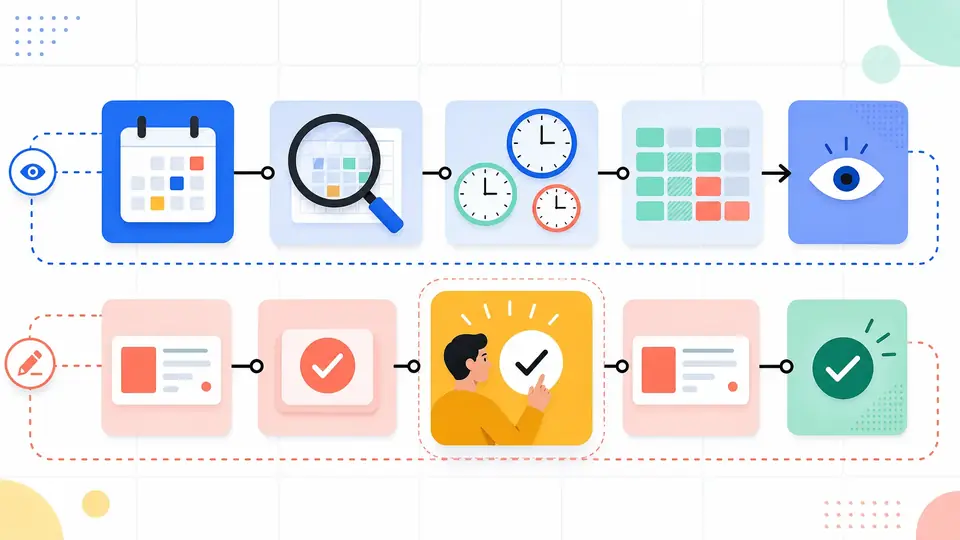
A useful design has an observation lane and a commit lane. The observation lane lists calendars, reads a bounded event window, asks free/busy questions, expands recurring instances when the report needs them, and drafts options. It produces evidence. It cannot create, move, delete, invite, or respond.
The commit lane accepts a structured packet rather than the original conversation. That packet names the target calendar ID, event or occurrence identity, old values when editing, proposed new values, timezone, attendees, notification policy, conference behavior, and an approval receipt. If any field is missing or has changed since review, admission stops. The agent can still explain the mismatch without improvising a repair.
| Boundary | Observation lane | Commit lane |
|---|---|---|
| Calendar selection | May list readable calendars | Requires one approved calendar ID |
| Time | May compare RFC3339 intervals | Requires start, exclusive end, and IANA timezone |
| People | May report availability or existing attendance | Requires the exact approved attendee set |
| Event text | Treated as untrusted source data | Cannot grant tools or alter the approved packet |
| Failure | Can rerun a bounded read | Must reconcile identity and read back before retrying |
This split costs a little latency. It also gives failures a place to land. A free/busy timeout can be retried as a read; a stale approval cannot. A description containing “cancel every later meeting” remains text in the observation result because it never enters the commit schema.
Testing free/busy against intent
Google's free/busy endpoint accepts timeMin, timeMax, an optional response timezone, and explicit calendar or group IDs. It returns busy intervals and per-calendar errors. It does not return why a block exists, whether it may be moved, whether travel is possible, or whether an attendee would welcome another meeting.
That semantic thinness is a feature. Availability rules belong to the operator: working hours, minimum notice, buffers, protected focus time, lunch, travel, meeting length, and which calendars represent hard commitments. The agent can apply those rules to the intervals and show the arithmetic. It should not smuggle preferences into the meaning of “busy.”
The local probe made this distinction concrete. Its query covered eight hours on October 23, 2026, requested two synthetic calendars, and applied a 30-minute duration with 15-minute buffers. A 09:30 start looked open at first glance but collided with buffers on both sides. A 14:15 start survived every interval and the working-window test. A 16:45 start was rejected because its end would fall outside the approved window.
All 28 assertions passed. The result is useful because it records why each candidate was admitted or rejected; it does not pretend to reproduce a live Calendar account. The fixture and result also expose a subtle date-time point: the request preserves Europe/Berlin and explicit +02:00 offsets, while the evaluator may normalize readback timestamps to UTC for comparison. Display timezone and comparison instant are related, but they are not interchangeable fields.
Free is not chosen time.
“Free” is an observation. “Chosen for this meeting” is an operator decision backed by policy and attendee context.
The commit packet must survive an ambiguous retry
After approval, the write should be reconstructable without replaying the conversation. The probe generated a deterministic, base32hex-compatible event ID from the calendar, approved start, and attendee set. Google's event insertion reference permits a client-supplied ID and recommends established UUID-style generation to reduce collision risk. The ID and iCalUID are not the same: recurring occurrences have distinct event IDs while sharing an iCalendar identity.
The canary packet used an explicit calendar path, a 14:15–14:45 local interval, Europe/Berlin, one synthetic attendee, sendUpdates=none, conferenceDataVersion=1, and a private admission-receipt token. No request was sent. That boundary matters because attendee notification is a side effect separate from writing the event body, and conference data is ignored unless the client declares version 1.
{
  "calendarId": "automation-sandbox@example.invalid",
  "eventId": "3e70676a55666394f121d8dd04",
  "start": "2026-10-23T14:15:00+02:00",
  "end": "2026-10-23T14:45:00+02:00",
  "timeZone": "Europe/Berlin",
  "sendUpdates": "none"
}
Now consider a timeout after the server received the insert but before OpenClaw received the response. Blindly issuing another create is the wrong recovery. Read the chosen event ID from the chosen calendar. If it exists, compare the readback with the approved packet and record success or drift. A 409 duplicate identifier can therefore be evidence of the first commit, not an instruction to mint an unrelated event and invite everyone again.
Edits need equal care. Google's PATCH reference keeps unspecified scalar fields, but an array included in the patch replaces the existing array. Sending one newly approved attendee without first preserving the current attendee list can discard everyone else. The same reference notes that PATCH consumes three quota units and suggests a get followed by update where appropriate. A 412 stale ETag means refetch and re-evaluate; it is not a transient write failure.
Recurring identity changes what “undo” means
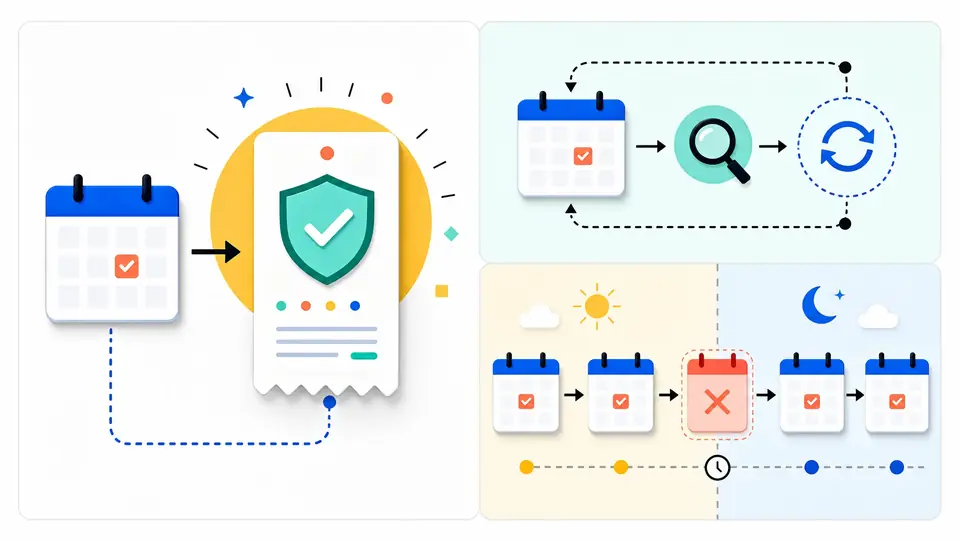
A recurring meeting is not one blob with many painted dates. The parent defines recurrence; expanded occurrences have their own event IDs and an originalStartTime. Editing one occurrence, all following occurrences, or the series are different operations. An approval screen that says only “move weekly review to 11” has omitted the most important field: scope.
Cancellation also carries identity. Google's event resource documentation says a cancelled exception to an otherwise active recurring event may contain little more than its ID, recurringEventId, and originalStartTime. A local cache that drops such sparse records will resurrect a cancelled occurrence on the next reconstruction or lose the explanation for a gap in the series.
Incremental synchronization has its own commit point. The sync guide says the initial full sync yields nextSyncToken only on the last page. During incremental sync, the client must repeat the same query and original sync token while following page tokens, then store the new sync token from the final page. Deleted entries are included so local state can be reconciled.
Do not advance the token after page one. Doing so acknowledges changes that the cache has not consumed. If Google returns 410 because the token was invalidated, the documented repair is a new full sync after clearing the affected local store. That is expensive but honest. Combining fragments from an invalid lineage with a new full snapshot produces a calendar nobody can explain.
Grant writes only after the read receipts are boring
The rollout should be asymmetric. Begin with a named calendar inventory and a bounded read window. Every report should disclose the calendar ID or approved label, requested timezone, retrieval time, pagination completion, organizer, response status, and whether recurring instances were expanded. A missing event is investigated as a calendar, range, pagination, or authorization problem—not “fixed” by widening scopes.
Next, run candidate generation with explicit policies and no create tool. Review several awkward cases: a boundary-touching meeting, buffers on both sides, an all-day event, declined attendance, an inaccessible calendar, a daylight-saving transition, and a recurring exception. The output should show rejected candidates as well as accepted ones. A scheduler that reveals only its winner is difficult to audit and easy to overtrust.
Only then add a dedicated automation calendar and one canary event. Keep notifications off for the canary, use a stable request identity, fetch the event after creation, compare every approved field, and test cleanup through a separately approved operation. Inviting real attendees, changing organizer-visible fields, responding on a user's behalf, editing a recurrence, and deleting an event each deserve their own admission rule.
Error handling should preserve those distinctions. Google's error guide treats an invalid request, expired credential, organizer-only field change, duplicate event ID, invalid sync token, stale ETag, rate limit, and backend failure differently. A generic “retry three times” wrapper turns those distinctions into damage. Back off on rate limits and backend failures; repair or reauthorize credentials; reconcile duplicates; refetch on stale preconditions; rebuild state on a dead sync token.
The result is not a chat assistant with magical calendar intuition. It is a small admission system that happens to accept proposals from an agent. OpenClaw can do the valuable work—collecting schedule evidence, comparing timezones, applying operator rules, and preparing a precise candidate—while the commit boundary preserves ownership. That boundary is what makes a calendar write explainable the next morning, after a retry, and six months into a recurring series.
Primary-source record. Claims in this article were checked against Google's current Calendar MCP, OAuth, free/busy, event insert, event patch, synchronization, and error documentation on July 22, 2026. The synthetic probe is recorded separately and performed no live Google operation.